 fec185075b
- Expanded .env.example to include detailed test configuration options for chat and user IDs.
- Updated README.md to reflect new testing instructions and configuration details.
- Improved documentation on error handling and robustness of the Telegram MCP server.
11 KiB
Telegram MCP Server

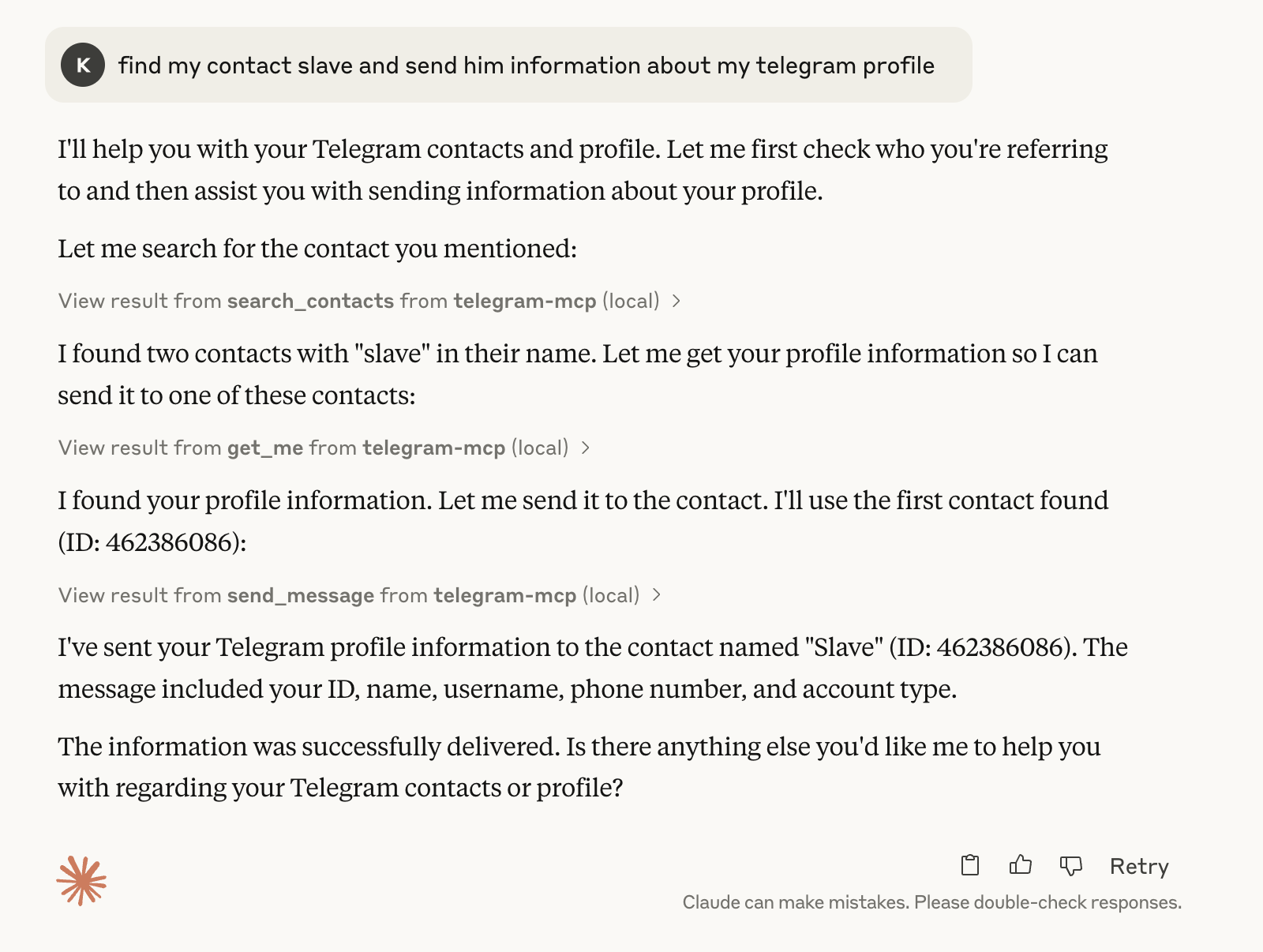
A full-featured Telegram integration for Claude, Cursor, and any MCP-compatible client, powered by Telethon and the Model Context Protocol (MCP). This project lets you interact with your Telegram account programmatically, automating everything from messaging to group management.
Maintained by l1v0n1. Forked from chigwell/telegram-mcp.
🚀 Features & Tools
This MCP server exposes a huge suite of Telegram tools. Every major Telegram/Telethon feature is available as a tool!
Chat & Group Management
- get_chats(page, page_size): Paginated list of chats
- list_chats(chat_type, limit): List chats with metadata and filtering
- get_chat(chat_id): Detailed info about a chat
- create_group(title, user_ids): Create a new group
- create_channel(title, about, megagroup): Create a channel or supergroup
- edit_chat_title(chat_id, title): Change chat/group/channel title
- edit_chat_photo(chat_id, file_path): Set chat/group/channel photo
- delete_chat_photo(chat_id): Remove chat/group/channel photo
- leave_chat(chat_id): Leave a group or channel
- get_participants(chat_id): List all participants
- get_admins(chat_id): List all admins
- get_banned_users(chat_id): List all banned users
- promote_admin(chat_id, user_id): Promote user to admin
- demote_admin(chat_id, user_id): Demote admin to user
- ban_user(chat_id, user_id): Ban user
- unban_user(chat_id, user_id): Unban user
- get_invite_link(chat_id): Get invite link
- export_chat_invite(chat_id): Export invite link
- import_chat_invite(hash): Join chat by invite hash
- join_chat_by_link(link): Join chat by invite link
Messaging
- get_messages(chat_id, page, page_size): Paginated messages
- list_messages(chat_id, limit, search_query, from_date, to_date): Filtered messages
- send_message(chat_id, message): Send a message
- reply_to_message(chat_id, message_id, text): Reply to a message
- edit_message(chat_id, message_id, new_text): Edit your message
- delete_message(chat_id, message_id): Delete a message
- forward_message(from_chat_id, message_id, to_chat_id): Forward a message
- pin_message(chat_id, message_id): Pin a message
- unpin_message(chat_id, message_id): Unpin a message
- mark_as_read(chat_id): Mark all as read
- get_message_context(chat_id, message_id, context_size): Context around a message
- get_history(chat_id, limit): Full chat history
- get_pinned_messages(chat_id): List pinned messages
Contact Management
- list_contacts(): List all contacts
- search_contacts(query): Search contacts
- add_contact(phone, first_name, last_name): Add a contact
- delete_contact(user_id): Delete a contact
- block_user(user_id): Block a user
- unblock_user(user_id): Unblock a user
- import_contacts(contacts): Bulk import contacts
- export_contacts(): Export all contacts as JSON
- get_blocked_users(): List blocked users
- get_contact_ids(): List all contact IDs
- get_direct_chat_by_contact(contact_query): Find direct chat with a contact
- get_contact_chats(contact_id): List all chats with a contact
- get_last_interaction(contact_id): Most recent message with a contact
User & Profile
- get_me(): Get your user info
- update_profile(first_name, last_name, about): Update your profile
- set_profile_photo(file_path): Set your profile photo
- delete_profile_photo(): Remove your profile photo
- get_user_photos(user_id, limit): Get a user's profile photos
- get_user_status(user_id): Get a user's online status
Media
- send_file(chat_id, file_path, caption): Send a file
- send_voice(chat_id, file_path): Send a voice message
- download_media(chat_id, message_id, file_path): Download media
- upload_file(file_path): Upload a file to Telegram servers
- get_media_info(chat_id, message_id): Get info about media in a message
Search & Discovery
- search_public_chats(query): Search public chats/channels/bots
- search_messages(chat_id, query, limit): Search messages in a chat
- resolve_username(username): Resolve a username to ID
Stickers, GIFs, Bots
- get_sticker_sets(): List sticker sets
- send_sticker(chat_id, file_path): Send a sticker
- get_gif_search(query, limit): Search for GIFs
- send_gif(chat_id, gif_id): Send a GIF
- get_bot_info(bot_username): Get info about a bot
- set_bot_commands(bot_username, commands): Set bot commands (bot accounts only)
Privacy, Settings, and Misc
- get_privacy_settings(): Get privacy settings
- set_privacy_settings(key, allow_users, disallow_users): Set privacy settings
- mute_chat(chat_id): Mute notifications
- unmute_chat(chat_id): Unmute notifications
- archive_chat(chat_id): Archive a chat
- unarchive_chat(chat_id): Unarchive a chat
- get_recent_actions(chat_id): Get recent admin actions
📋 Requirements
- Python 3.10+
- Telethon
- MCP Python SDK
- Claude Desktop or Cursor (or any MCP client)
🔧 Installation & Setup
1. Fork & Clone
git clone https://github.com/chigwell/telegram-mcp.git
cd telegram-mcp
2. Create a Virtual Environment
python3 -m venv .venv
source .venv/bin/activate  # On Windows: .venv\Scripts\activate
pip install -r requirements.txt
3. Generate a Session String
python session_string_generator.py
Follow the prompts to authenticate and update your .env file.
4. Configure .env
Copy .env.example to .env and fill in your values:
TELEGRAM_API_ID=your_api_id_here
TELEGRAM_API_HASH=your_api_hash_here
TELEGRAM_SESSION_NAME=anon
TELEGRAM_SESSION_STRING=your_session_string_here
Get your API credentials at my.telegram.org/apps.
⚙️ Configuration for Claude & Cursor
Claude Desktop
Edit your Claude config (e.g. ~/Library/Application Support/Claude/claude_desktop_config.json):
{
  "mcpServers": {
    "telegram-mcp": {
      "command": "/full/path/to/.venv/bin/python",
      "args": ["main.py"],
      "cwd": "/full/path/to/telegram-mcp-server"
    }
  }
}
Cursor
Edit ~/.cursor/mcp.json:
{
  "mcpServers": {
    "telegram-mcp": {
      "command": "/full/path/to/.venv/bin/python",
      "args": ["main.py"],
      "cwd": "/full/path/to/telegram-mcp-server"
    }
  }
}
🧪 Testing
A comprehensive test script is included to validate all functionality:
# Basic test (redirects output to file)
python test.py > test_output.txt 2>&1
The test script uses environment variables from your .env file to configure testing parameters. See .env.example for all available test configuration options.
Test Configuration
You can configure test parameters in your .env file:
# A safe chat ID where tests can send/delete messages
TEST_CHAT_ID=your_saved_messages_id

# A supergroup you admin for testing group operations
TEST_SUPERGROUP_ID=your_supergroup_id

# A test user account ID (not a real person unless they consent)
TEST_USER_ID=test_user_id
The tests are designed to be non-destructive, but use caution when testing with real accounts.
🎮 Usage Examples
- "Show my recent chats"
- "Send 'Hello world' to chat 123456789"
- "Add contact with phone +1234567890, name John Doe"
- "Create a group 'Project Team' with users 111, 222, 333"
- "Download the media from message 42 in chat 123456789"
- "Mute notifications for chat 123456789"
- "Promote user 111 to admin in group 123456789"
- "Search for public channels about 'news'"
- "Join the Telegram group with invite link https://t.me/+AbCdEfGhIjK"
- "Send a sticker to my Saved Messages"
- "Get all my sticker sets"
You can use these tools via natural language in Claude, Cursor, or any MCP-compatible client.
🧠 Error Handling & Robustness
This implementation includes comprehensive error handling:
- Session management: Works with both file-based and string-based sessions
- Error reporting: Detailed errors logged to
mcp_errors.log - Graceful degradation: Multiple fallback approaches for critical functions
- User-friendly messages: Clear, actionable error messages instead of technical errors
- Account type detection: Functions that require bot accounts detect and notify when used with user accounts
- Invite link processing: Handles various link formats and already-member cases
The code is designed to be robust against common Telegram API issues and limitations.
🛠️ Contribution Guide
- Fork this repo: chigwell/telegram-mcp
- Clone your fork:
git clone https://github.com/<your-github-username>/telegram-mcp.git - Create a new branch:
git checkout -b my-feature - Make your changes, add tests/docs if needed.
- Push and open a Pull Request to chigwell/telegram-mcp with a clear description.
- Tag @l1v0n1 in your PR for review.
🔒 Security Considerations
- Never commit your
.envor session string. - The session string gives full access to your Telegram account—keep it safe!
- All processing is local; no data is sent anywhere except Telegram's API.
- Use
.env.exampleas a template and keep your actual.envfile private. - Test files are automatically excluded in
.gitignore.
🛠️ Troubleshooting
- Check logs in your MCP client (Claude/Cursor) and the terminal for errors.
- Detailed error logs can be found in
mcp_errors.log. - Interpreter errors? Make sure your
.venvis created and selected. - Database lock? Use session string authentication, not file-based sessions.
- iCloud/Dropbox issues? Move your project to a local path without spaces if you see odd errors.
- Regenerate session string if you change your Telegram password or see auth errors.
- Bot-only functions will show clear messages when used with regular user accounts.
- Test script failures? Check test configuration in
.envfor valid test accounts/groups.
📄 License
This project is licensed under the Apache 2.0 License.
🙏 Acknowledgements
- Telethon
- Model Context Protocol
- Claude and Cursor
- chigwell/telegram-mcp (upstream)
Maintained by l1v0n1. PRs welcome!